REMEMBER:

•  Add your name to your projects
•  Save Photoshop projects as PSD and JPG
•  Save Bryce projects as BR7 and [Save Image As] JPG
•  Save Sculptris projects as SC1 and JPG and export it as an OBJ.
•  Save Rhino projects as 3DM and JPG
•  Save Flash projects as FLA and go to FILE>PUBLISH SETTINGS and publish as SWF and JPG
•  Upload finished projects to your portfolio and/or your DeviantArt page
•  Keep checking your grade on PowerSchool
DOWNLOADS:
Download Bryce 5 Trial Version
Download Sweet Home 3D
Download Rhino 3D 5.0 Trial Version
Download Sculptris
Download Windows Movie Maker 2.6
Download Java JDK
Download Greenfoot
Showing posts with label Animal. Show all posts

Wednesday, April 23, 2014

Rhino: Wooden Pull Toy

Today we are going to be creating a wooden pull-toy which will include wheels, axles, a rope, etc.  Remember that a wooden toy for children typically has rounded (filleted) edges.  Because there isn't a definite pattern for this project, I expect it will take a couple days to find a good design, model the body, create the wheels, etc.  Over the next couple days [while you are working on this project] I will also be grading your projects.

The basic outline for what we're doing includes:
  • Add a "BackgroundBitmap" 
  • Trace with a complete "Control Point Curve"
  • Remove the BackgroundBitmap
  • Extrude the Curve
  • Cap the Curve
  • FilletEdge (if possible) -- although complex curves almost never work
  • Add a base platform (if necessary)
  • Add wheels (cylinders) and axles (cylinders)
  • Draw a curve for a rope/string
  • Bend the rope/string curve to "hang" to the ground
  • Pipe the rope/string curve
  • Add a floor and walls
  • Texture all of your pieces
  • Add lighting as needed

Here are some examples of wooden pull toys that I found simply by typing "wooden pull toys" in Google.

Notice the different ways that wheels are done, different painting styles, different types of wood pieces (spheres, flat wood, beveled edges, etc.), and different methods for ropes/pulls.
 
You can also find woodworking plans on the Internet which you can actually use to create 3D models.  Here are a few examples:
Something else you might want to try is doing a search for "silhouette animal".  Here are a couple examples:
Using the camel silhouette, I traced a curve, extruded it, capped it, filleted the edges, and created the following pull-toy:


Wednesday, February 5, 2014

Sculptris: Sea Creature

Today we are going to be using Sculptris to create a "Sea Creature" -- or some other thing that we can put into our "Under Water Scene" when we get to Bryce.  There's really no right or wrong way to do this assignment (other than, "Oh, look... it's a bubble."), so get creative.

You can see from the examples below that there were several different approaches to this project -- some went for real creatures and some went for fanciful.  Notice the first picture in the set has an underwater background.  That is achievable by changing your background picture in Sculptris.


A student designed the following creepy creature in Sculptris...
Then put it in an under water scene in Bryce (another 3D program) later on.

IMPORTANT: I suggest saving regularly as Sculptris has a tendency to crash.  To do so, simply click the SAVE button (or do a CTRL+S) and save it to your Thawspace.  This will save it as a Sculpture file (.sc1).

When finished with your model, I would also like you to Export the file as an Object which we can use in other programs (such as Bryce).  To do so, simply click the EXPORT OBJ button (or do a CTRL+E) and save it to your Thawspace.  This will save it as a Wavefront (.obj) file.

Finally, I would like you to save an image of your file to include on your Blog Portfolio and your deviantART page.  Simply go to OPTIONS and then click on SAVE IMAGE and save it to your Thawspace.  This will save it as a PNG file.

So for each project you should have an SC1, an OBJ and a PNG file.

Thursday, October 10, 2013

Photoshop: Plantimal / Chimera

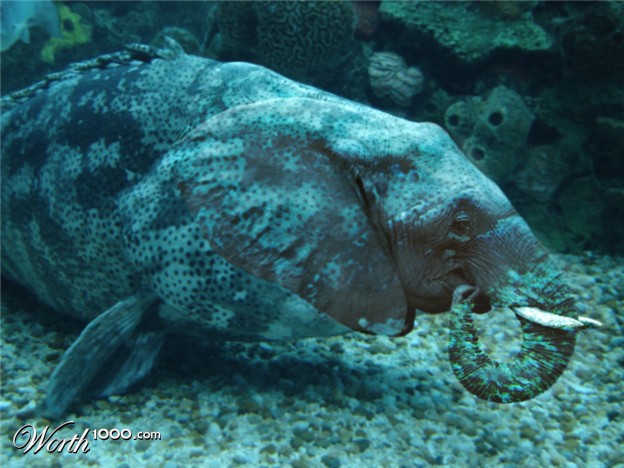
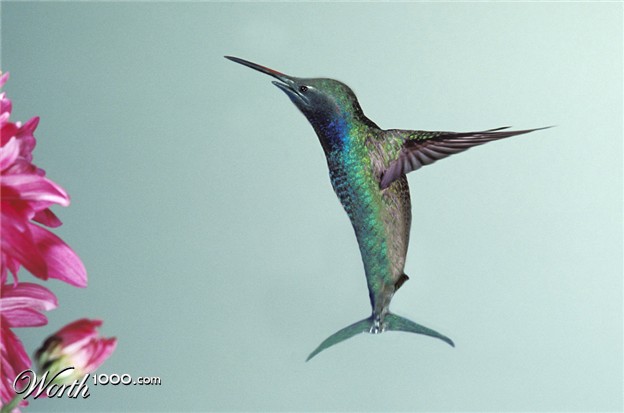
Today and tomorrow we will be doing some "mad scientist" work with Photoshop.  I want you to combine either a plant and an animal (a Plantimal) or combine two animals (a Chimera) into a single creature.  It will help to choose things that have similar colors or textures or at least are facing the same direction.  I am looking forward to seeing what you can come up with.

Please take your time to make these as seamless as possible.  I suggest starting with LARGE images so you can blend things easier and still come out with a good sized final product.

(Extra points for original "visual puns" -- i.e. "Sea Lion" or "Dande-Lion" or "Dragon-Fly")  XD

First, some examples of Plantimals:
Dande-Lion by Megan Griffith
Spider-Monkey by Griff (from class demonstration)
A Dragon-Fly by Griff (from class demonstration)


Some examples of Chimeras include: